

Daily news on science and technology in Virginia
Provided by AGP
ReputationRiser Announces Google Review Widget for Local Businesses Displaying 5-Star Reviews
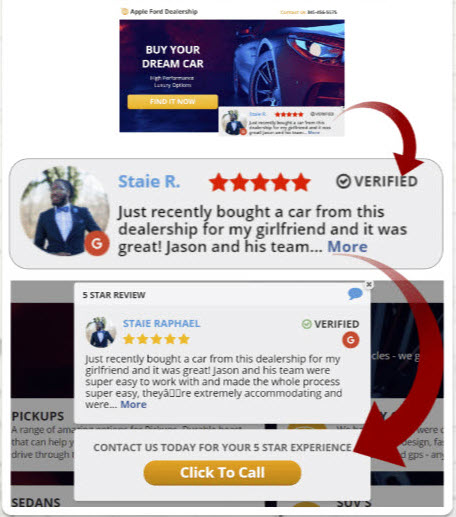
ReputationRiser is a Google review widget that displays verified 5-star Google reviews on local business websites with built-in click-to-call buttons.
The Google review widget helps local businesses display 5-star Google reviews on their websites with automatic updates and CTA buttons.
ReputationRiser was built to help businesses display their 5-star reviews where visitors are deciding whether to call, book, or submit a form.”
ARLINGTON, VA, UNITED STATES, May 8, 2026 /EINPresswire.com/ -- ReputationRiser has announced a Google review widget designed to help local businesses display only their 5-star Google reviews on their websites through a mobile-friendly, auto-updating widget.— Tim Sumer
Unlike many Google reviews widget tools that display a broader review feed, ReputationRiser is built for businesses that want their 5-star Google reviews more visible across their website. The Google review widget automatically pulls eligible 5-star Google reviews and live streams them into a mobile-friendly display, helping website visitors see real social proof without leaving the page.
ReputationRiser gives local businesses an alternative to static testimonial sections or manually copied reviews. When a business earns a new 5-star Google review, it is automatically added to the ReputationRiser review widget, helping businesses keep their review content fresh without manually editing website pages.
The Google review widget also includes built-in call-to-action options, such as click-to-call or click-to-book buttons. This allows businesses to place customer feedback and contact actions in the same website experience, helping visitors read relevant social proof and take the next step from the same page.
“Local businesses often have strong Google reviews, but those reviews may not be visible when a visitor is evaluating the company’s website,” said Tim Sumer, Founder of ReputationRiser. “ReputationRiser was built to help businesses display their 5-star reviews where visitors are deciding whether to call, book, or submit a form.”
Google reviews are a key trust signal for many local businesses, especially in service categories where customers compare several providers before making contact. ReputationRiser is designed for businesses that want a Google reviews widget for website use without relying on static testimonial pages or ongoing manual updates.
The widget can be used by home service companies, healthcare providers, med spas, dentists, chiropractors, auto repair shops, roofers, plumbers, HVAC companies, digital agencies, and other local businesses where customer trust can influence calls, bookings, and lead form submissions.
Setup is handled through a small code snippet that can be added to most website platforms. Once installed, the widget displays 5-star Google reviews and adds new 5-star reviews automatically, helping businesses keep their best reviews visible without ongoing technical work.
ReputationRiser is also relevant for businesses researching how to add Google reviews to a website, how to use a widget for Google reviews, or how to display 5-star Google reviews on a website through an auto-updating review widget.
Local businesses can learn more about ReputationRiser at ReputationRiser.com.
About ReputationRiser
ReputationRiser helps businesses display verified 5-star Google reviews on their websites through a simple, mobile-friendly Google review widget. The platform is designed to help businesses make customer reviews more visible, strengthen credibility, and support more calls, bookings, and leads from website visitors.
Tim Sumer
ReputationRiser
email us here
Visit us on social media:
LinkedIn
Facebook
X
Other
How to Add a Google Reviews Widget to Your Website
Legal Disclaimer:
EIN Presswire provides this news content "as is" without warranty of any kind. We do not accept any responsibility or liability for the accuracy, content, images, videos, licenses, completeness, legality, or reliability of the information contained in this article. If you have any complaints or copyright issues related to this article, kindly contact the author above.
